UpNote's help center answers whether your notes are end-to-end encrypted in four words: "Not at this time." They sync through Firebase, a Google service, on servers in the United States. The same page says UpNote is made by a two-person team in Vietnam, and for two people it covers a lot: apps for Mac, Windows, Linux, iPhone, iPad and Android, notebooks inside notebooks, offline use without an account, and Premium at $1.99 a month or $39.99 once.
Encryption is one reason people look around. The others are things UpNote does not have: a web version, AI, and a shared note that other people can edit rather than only read. The free plan stops at 50 notes, and tables, attachments, locked notes and Markdown export all need Premium. Below are five apps to move to, grouped by what you are after, plus Grape, which comes first because this is Grape's blog. Its entry also says what it does not do.
How your notes leave UpNote
Exporting everything happens in the desktop app: File > Export all notes on a Mac, Settings > General > Export all notes on Windows. A single notebook exports from the More button beside its name, and the phone apps export one note at a time. UpNote writes PDF, plain text, HTML or Markdown, and HTML and Markdown come out as a folder, with pictures and attachments in a Files folder inside it. Markdown and PDF export are part of Premium and stop working when it ends, so export before you cancel. Since version 9.18 in March, UpNote saves an export "without a complex folder structure", in its own words, so if your notebooks matter, export them one at a time.
Tags in UpNote are hashtags in the text, so they travel inside the notes. Each app takes the export its own way:
| App | How the notes get in | What comes across |
|---|---|---|
| Grape | The Markdown export, on desktop, phone or in the browser, any plan | Text, checklists, tables, pictures and tags. Other attachments stay behind as their names |
| Notesnook | Its own UpNote importer, from the HTML export, on the web or desktop | Formatting, pictures, attachments and tags |
| Joplin | The Markdown export, on desktop | Folders as notebooks, pictures and attached files |
| Obsidian | Copy the Markdown export into a vault | The files as they are, hashtags working as tags |
| Bear | Bear's UpNote guide: Markdown export, then Markdown Folder import on a Mac | Text and hashtags. The guide lists nothing else |
| Notion | The Markdown export, zipped | Text, and folders from the zip |
If you want UpNote with what it is missing
Grape
Grape runs on the same five systems as UpNote (iPhone, Android, Mac, Windows and Linux) and also in a browser at app.grape.cool on a computer or a tablet, on every plan. Its agent reads across all your notes, not only the one that is open. Ask what the physio said about Saturday's long run and it answers from the training plan, checks the physio's note too, and names the notes it read. The notes live in a database on your device, so they open with no connection. You can also record into a note while you write in it.
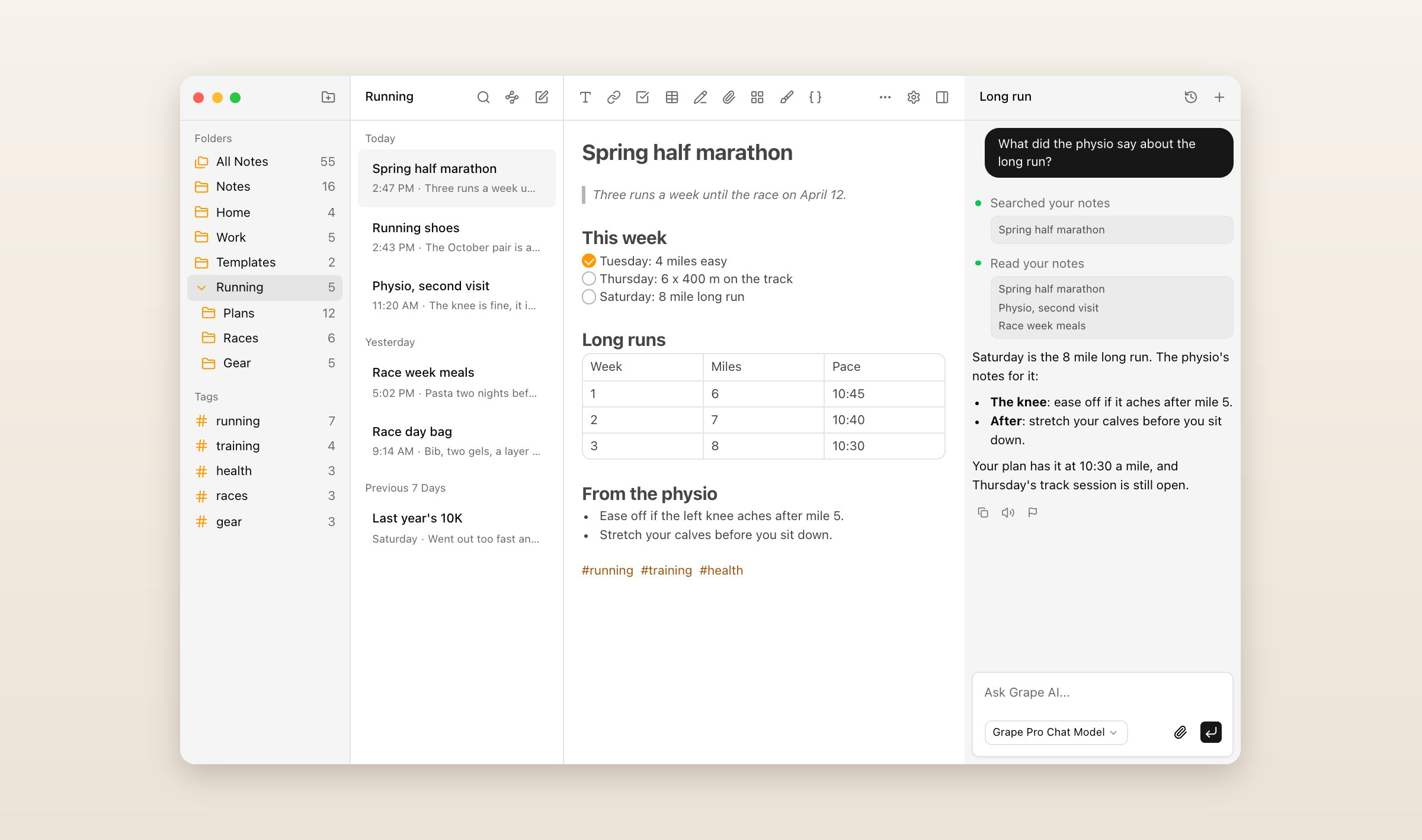
The free plan has no note limit and no account, and it includes what UpNote keeps for Premium: tables, pictures and PDFs, locked notes, and export to Markdown, Word, PDF or HTML whenever you like. A locked note is encrypted on your device with a password only you know, so nobody else, Grape included, can read it.
Grape has no UpNote importer. It reads the Markdown export the way it reads any folder of Markdown, on every plan: each file becomes a note, checklists and tables come across, hashtags become tags, and pictures the notes link to are copied in. PDFs and other attachments stay behind as their names, and the dates in UpNote's front matter are not read, so each note takes its file's date. Open a few notes with pictures afterward to check them. The steps are in the help article.
What you give up: only locked notes are end-to-end encrypted, and a locked note holds text only. Sharing a folder with people who can edit it needs Sync, Plus or Pro for everyone in it. Grape is free with no account. Sync is $3 a month, Plus is $9 with Grape's AI, Pro is $19 with the best model, and Lifetime is $49 once, with the AI on your own key and sync through your own Dropbox or Google Drive, where UpNote's $39.99 includes its own sync. Every plan is on the pricing page.
Notesnook
Notesnook is laid out much like UpNote, with notebooks, tags and colors down the side, and it is end-to-end encrypted by default, the thing UpNote's FAQ says it does not do. It runs on Windows, Mac, Linux, iPhone, iPad, Android and the web, it is open source, and the free plan has no limit on notes, though it uploads 50 MB of files a month and stops at 50 notebooks and 50 tags.
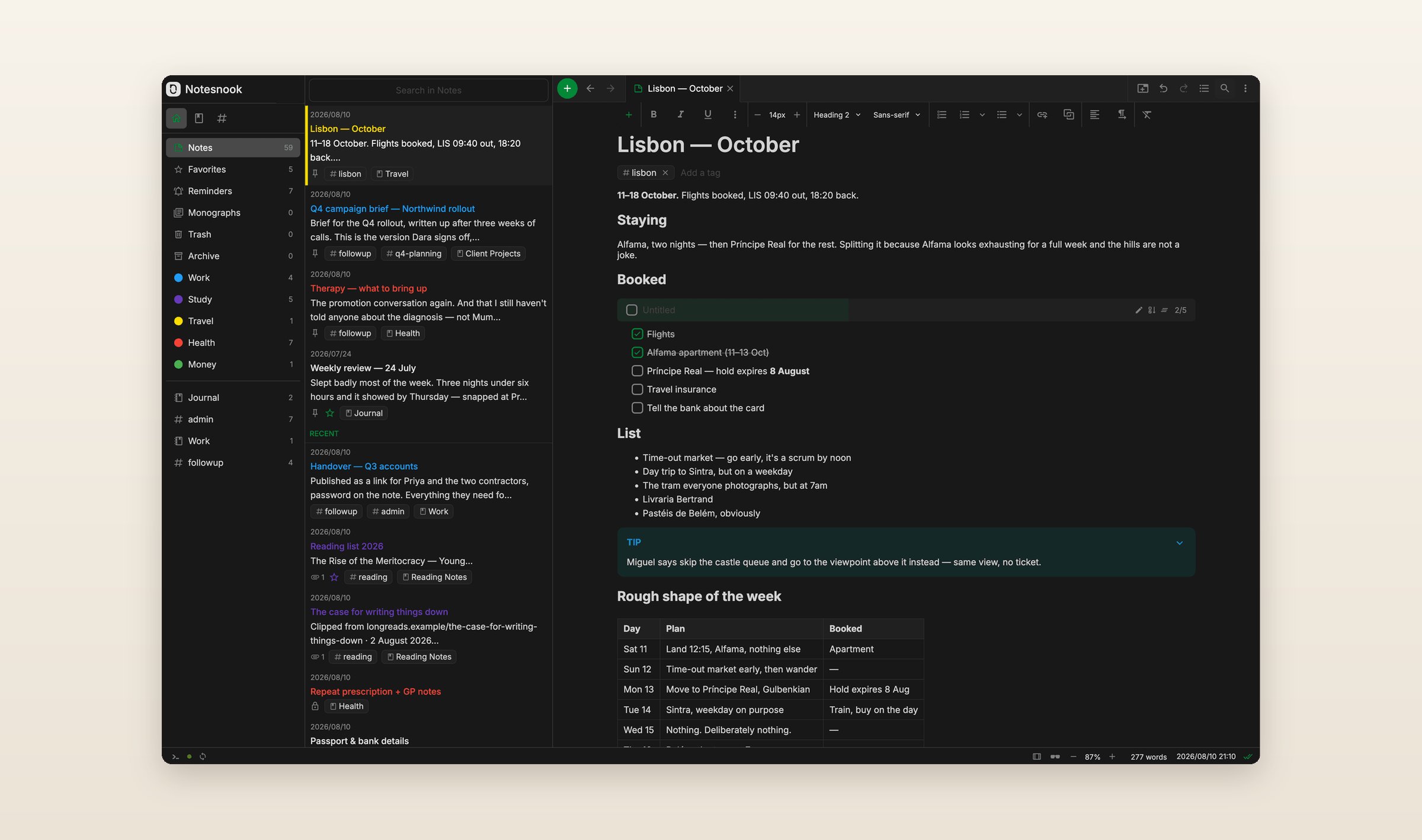
It is also the one app here with an UpNote importer, added in version 3.4 in June. You export all notes from UpNote's desktop app as HTML, zip the folder and drop it into the Notesnook Importer on the web or desktop, which its help says keeps formatting, pictures and attachments. Attachments count against your plan's storage. Essential is $1.99 a month or $19.99 a year in the US App Store, and Pro is $6.99 a month. There is no AI and no editing together, though a note can be published as a web page, with a password if you want one.
Joplin
Joplin is free and open source, on Windows, Mac, Linux, iPhone, iPad and Android, plus a web version that is the phone app running in a browser. You choose where it syncs: Joplin Cloud, or a service you already use, like Dropbox, OneDrive or Nextcloud. End-to-end encryption is there, but you turn it on yourself, on one device first.
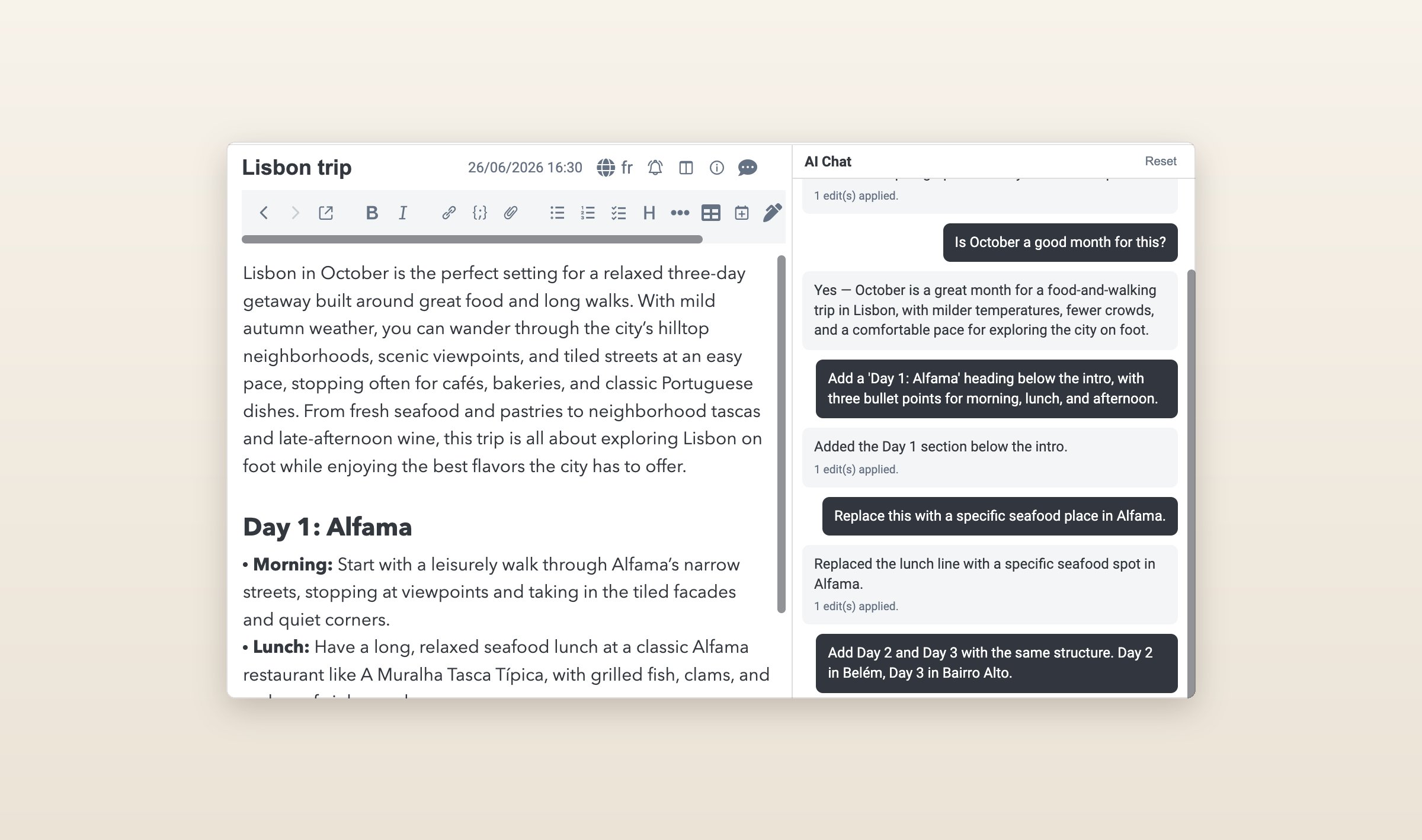
Joplin 3.7 in August brought AI: a chat panel, search by meaning and an MCP server. It is a beta, on the desktop only and off until you turn it on, and it runs on Joplin Cloud's AI, your own OpenAI or Anthropic key, or a model on your own computer. The Markdown importer, File > Import > MD - Markdown (directory), turns folders into notebooks and copies in the pictures and files the notes link to. Joplin Cloud starts at €2.99 a month, and sharing a notebook with other people needs its Pro plan at €5.99.
If you want your notes as files you own
Obsidian
Obsidian keeps every note as a Markdown file in a folder on your disk, which any editor can open, so UpNote's Markdown export is already most of the way there. Copy the export folder into a vault and the notes and their hashtags work as they are. Obsidian is free on Mac, Windows, Linux, iPhone, iPad and Android, with no web version, and plugins add almost anything else.
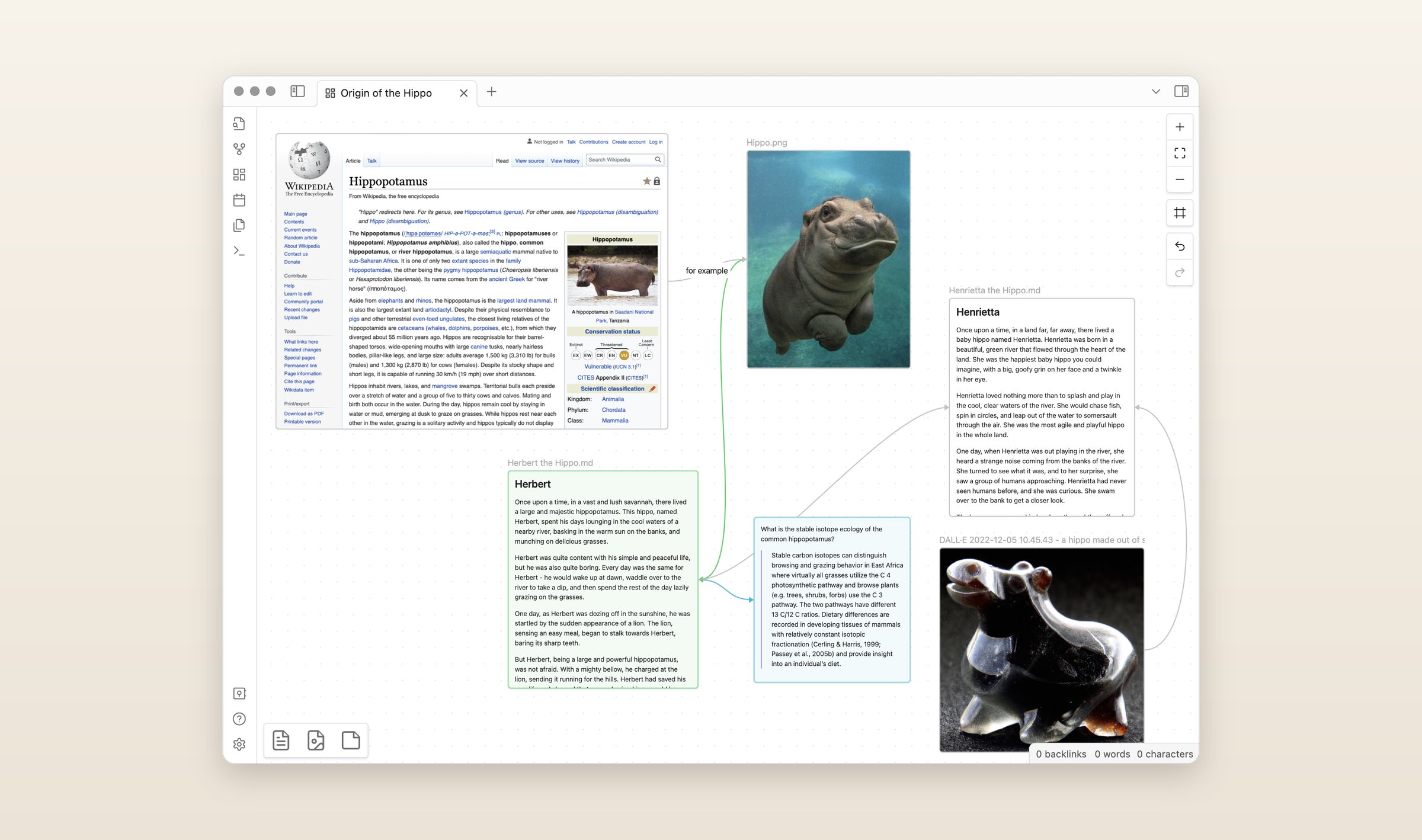
Sync is $4 a month paid yearly or $5 monthly, end-to-end encrypted, or you sync the folder yourself through another service. Other people can join a vault through Sync, and Publish puts notes on a website for $8 a month paid yearly. AI comes only from community plugins.
If every device you own is an Apple one
Bear
Bear runs on Mac, iPhone and iPad, notes are written in Markdown, and hashtags are its tags, so your UpNote tags keep working. It has a guide for moving from UpNote: in UpNote for Mac, select every note, export them to Markdown as separate documents, then in Bear choose File > Import From > Markdown Folder. The guide does not say what else comes across, so look over a few notes with pictures.
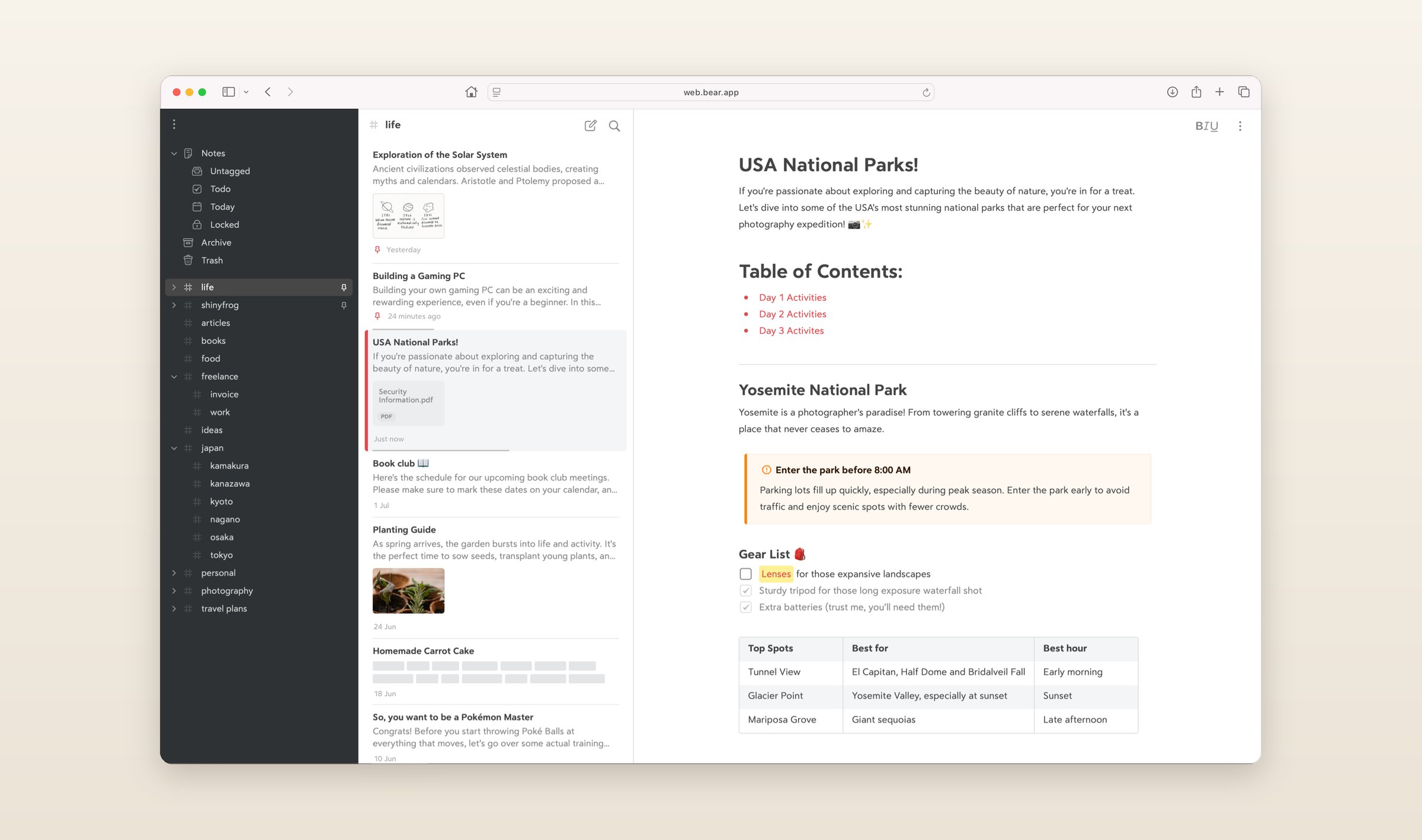
Bear Web is in beta at web.bear.app, and Bear plans to launch it officially by the end of November. On November 24, Pro goes from $2.99 a month or $29.99 a year to $3.99 or $39.99, with Bear Web included, and people who already subscribe keep their price. Pro is what adds iCloud sync, so the free plan stays on one device. Bear has no AI and no editing together, and it says it has no plans for Android or Windows.
If other people need to edit
Notion
A note shared from UpNote is a web page people can read. If you need them to write back, Notion is built for that: pages hold text, tables and databases, a team edits them together with comments and suggested edits, and a page can be published to the web. It runs on Mac, Windows, iPhone, iPad, Android and the web, with no Linux app.
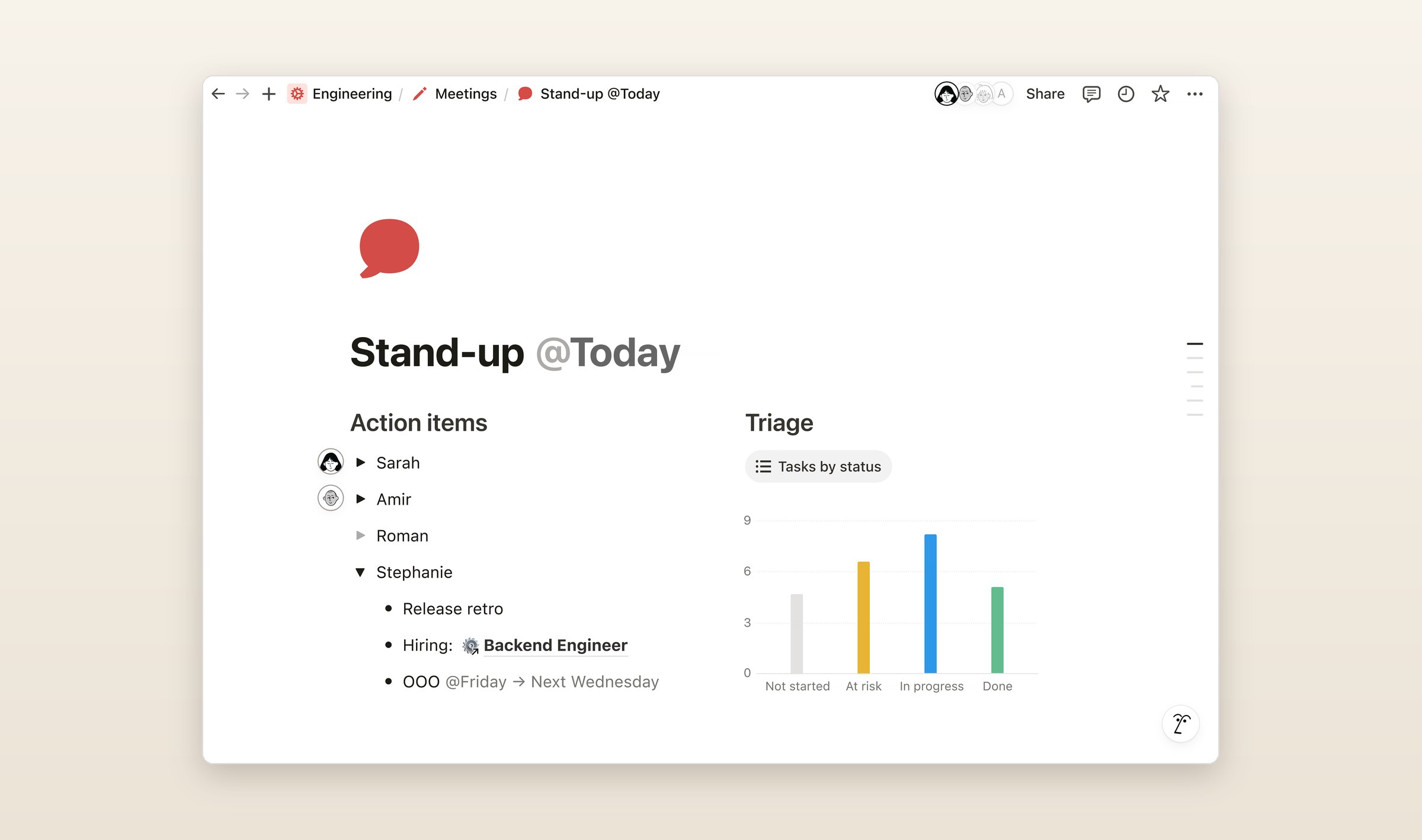
Notion has no UpNote importer, but it imports Markdown, and a zipped folder keeps its folders. Notion is free for one person, Plus is $12 a month or $10 paid yearly, and Notion AI comes with Business at $20 a month paid yearly, while Free and Plus get a limited number of AI answers to try it. Offline works in the desktop and phone apps, not the browser, and nothing is end-to-end encrypted.
What they cost
Monthly prices in US dollars, checked on November 15, 2026, except Joplin Cloud, which is priced in euros. The screenshots of the other five apps are their makers' own, from their websites and blogs.
| App | Free plan | Paid | Runs on | AI |
|---|---|---|---|---|
| UpNote | 50 notes | $1.99, or $39.99 once | Mac, Win, Linux, iOS, Android | None |
| Grape | Unlimited notes, no account | Sync $3, Plus $9, Pro $19, Lifetime $49 once | Mac, Win, Linux, iOS, Android, web | Plus and Pro, or your own key |
| Notesnook | Unlimited notes, 50 MB of uploads a month | Essential $1.99, Pro $6.99 | Mac, Win, Linux, iOS, Android, web | None |
| Joplin | The whole app, with the sync you set up | Joplin Cloud from €2.99 | Mac, Win, Linux, iOS, Android, web | Desktop only, in beta |
| Obsidian | Everything but Sync and Publish | Sync $5, or $4 paid yearly | Mac, Win, Linux, iOS, Android | Plugins only |
| Bear | One device, no sync | Pro $2.99, $3.99 from November 24 | Mac, iOS, web beta | None |
| Notion | One person | Plus $12 | Mac, Win, iOS, Android, web | Business plan |
Questions people ask
Does UpNote have a web version?
No. UpNote runs on Mac, Windows, Linux, iPhone, iPad and Android, and nothing in its help describes a web version. Grape, Notesnook, Joplin and Notion all run in a browser, and Bear Web is in beta.
Is UpNote end-to-end encrypted?
No. Its FAQ says notes are encrypted in transit and at rest, and to end-to-end encryption it answers "Not at this time." Notesnook encrypts every note end to end by default, Joplin does once you turn it on, Obsidian Sync does, and Grape does for the notes you lock.
How do I export all my notes from UpNote?
In the desktop app, choose File > Export all notes on a Mac or Settings > General > Export all notes on Windows, then pick Markdown or HTML. Pictures and attachments land in a Files folder inside the export. Markdown export needs Premium, and to keep your notebooks apart, export them one at a time.
What is the best free UpNote alternative?
Grape, Notesnook and Obsidian have no limit on notes on their free plans, and Joplin is free with whatever sync you set up. Notesnook's free plan uploads 50 MB of files a month. Bear's free plan does not sync, and Notion's is for one person.
Which UpNote alternative has AI?
Grape includes its AI on Plus at $9 a month, and the chat answers from all your notes rather than the open one. Joplin added AI in 3.7, on the desktop and in beta. Notion's AI comes with Business. Notesnook, Obsidian and Bear have none built in, and neither does UpNote.
Before you switch
Export your biggest notebook to Markdown today and import it into Grape on the free plan. Grape only reads the files, so nothing in UpNote changes, and you can keep using both while you decide.
Grape is available for iPhone, Android, Mac, Windows and Linux at grape.cool/download.