I've been using Apple Notes for the last 10 years. It's simple and fast, but since Apple isn't moving very fast with AI, I decided to do something myself.
Why I Built Grape
The first problem is finding old notes. Sometimes I know I wrote something important years ago, but I can't find it because I don't remember any keywords, any sentences, or even the title. Normal search doesn't help when you've forgotten everything about the note.
The second problem is the constant switching between apps. I'd research something in ChatGPT, copy the useful parts, paste them into Apple Notes, then go back to ChatGPT again. It became this annoying loop of ChatGPT, Apple Notes, ChatGPT, Apple Notes. At some point I thought, what if the AI lived inside the notes app instead of staying in a separate window?
Those two frustrations are the main reasons I started building Grape.
I realized that with vector indexing and modern AI, I could solve the search problem. Every note could be indexed so you can find it by meaning, even when you don't remember any specific words. And I wanted the AI to actually live inside the notes so you don't have to jump between two apps anymore.
Grape Desktop is Now in Beta
The desktop version of Grape is now in beta for macOS and Windows. It's the AI note taking app that thinks with you. It combines powerful note taking with AI that can actually help you work.
Key Features
Here's what's inside right now.
AI Chat with Tools
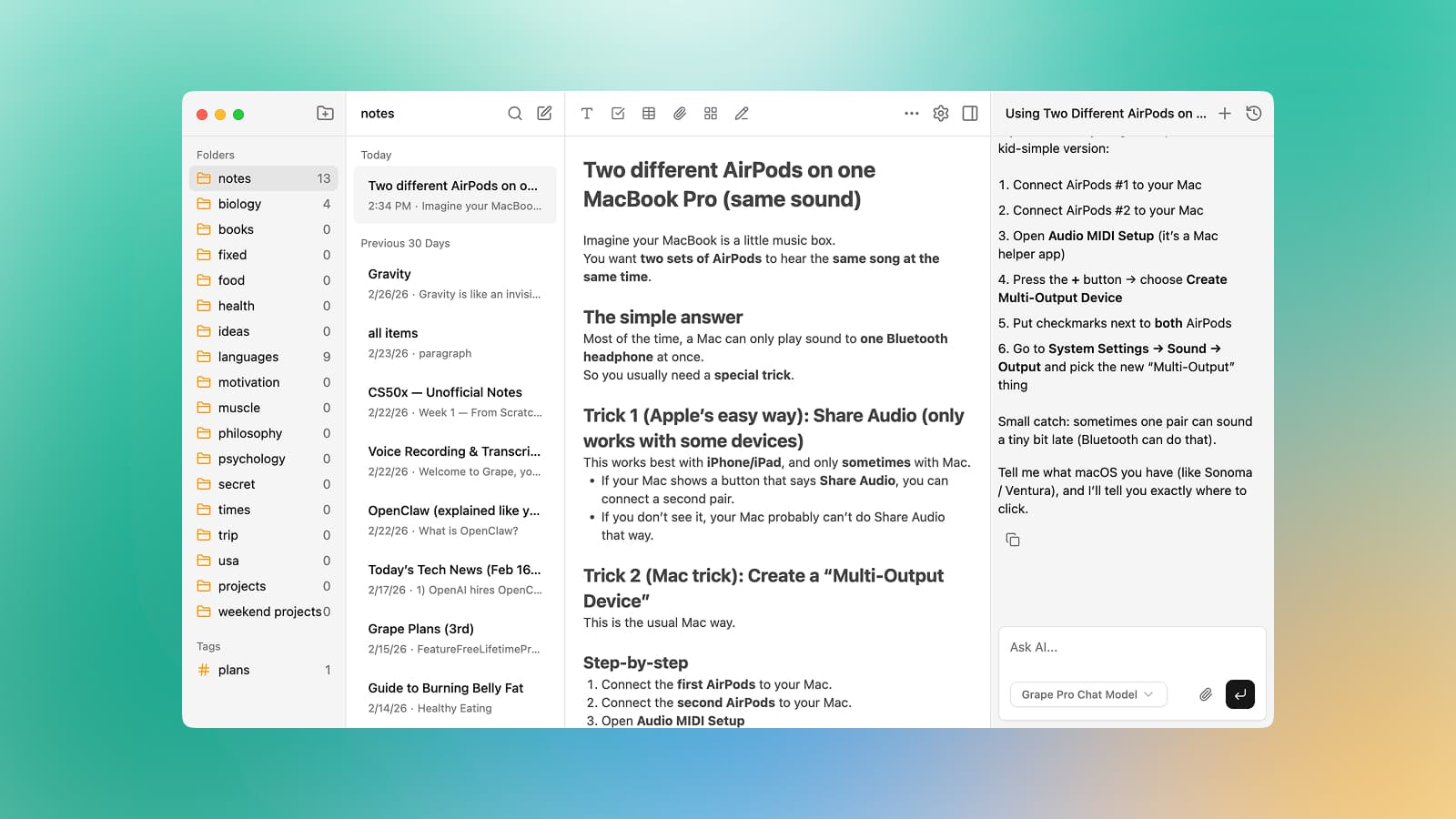
You can chat with AI directly in your notes. The AI understands your workspace and can create notes, update them, delete them, move them into folders, or search everything you've written. It can even search the web when you ask it to.
Semantic Search
Semantic search is built in from the beginning. Your notes are automatically indexed with vector embeddings, so you can find exactly what you need even if you don't remember the exact words.
Voice Recording and Transcription
Voice recording and transcription work directly inside notes. You can record voice memos and get instant AI transcription. You can also drag and drop audio files into your notes.
Powerful Rich Editor
The rich editor supports tables, checklists, code blocks, links, images, PDFs, math formulas, horizontal rules, and slash commands. Pasting Markdown converts cleanly into rich text.
Infinite Drawing Canvas
There's also an infinite drawing canvas inside your notes. You can sketch diagrams, wireframes, or ideas with freehand drawing and shapes.
AI Study Tools
AI can generate flashcards, adaptive quizzes, and mind maps from your notes. These study tools are embedded right inside the app.
And there's much more. You get nested folders and subfolders, tags, pin notes, version history, PDF support, dark mode, cross device sync on paid plans, multiple AI providers, and the ability to bring your own API keys.
Local-First Approach and Pricing
Grape is local first. Your data stays on your machine in a local database. The free plan already gives you unlimited notes and folders, the full rich editor, tags, voice recording, version history, attachments, and exports to Markdown, HTML or PDF.
There are also paid plans. Pro unlocks unlimited AI usage, semantic search, voice transcription, AI web search, AI-generated flashcards, quizzes and mind maps, priority support, and cross-device sync. There's a Lifetime plan as well for those who prefer a one-time purchase and want to bring their own AI API keys.
Ready to Try Grape?
You can download the desktop beta for free at grape.cool. No account is required to get started.
I've been shipping regular updates since the beta launched and I'm still actively improving the app based on feedback. If you try it and have any thoughts, I'd genuinely appreciate hearing from you.
Mobile Version Coming Soon
Mobile is coming too. I'm working on it right now and it should be ready soon. If you want to be the first to know when it drops, just join the waitlist on the front page at grape.cool.
This is the note taking app I built because I needed it myself. I hope it helps you capture ideas effortlessly, organize intelligently, and find anything instantly.